The Problem
Looking through my old projects, I noticed my 1st year SFML project (creatively termed “Robot Game”) has a consistent bug where the player and enemies twitch between their falling and standing animations.
I thought this would be a good opportunity to show my debugging process, starting from a clean slate (or however clean a slate can get after 4 years of forgetting).
First Guess
My instinct is that this is a float issue. I am guessing that when I was developing the game a piece of math was consistently falling on the side where everything worked correctly, and now it is falling on the other side.
Getting the Project Up and Running
It took a bit of searching on GitHub but I found the project listed under the university’s account:

Alright, so it’s a Visual Studio project. VS 2026 has good backwards compatibility so it should “just work”.
I compiled and ran the project, but I couldn’t replicate the bug. On the one hand that makes sense, if the bug had occurred during development I would have fixed it already. On the other hand, not being able to replicate an issue is one of the biggest barriers you can have in debugging.
But that was a debug build, what if I build it in Release? I see the same bug as in my archived version.
That narrows it down, its a difference between Debug and Release builds. I’m guessing some kind of math optimisation, but to figure it out I’ll have to dig into the code.
The Code
The bug appears consistently with that first enemy robot in the level, so I’ll look there before looking at the player.
//Animation/Sprite
Animation* currentAnimation;
if(isInvulnerable()) currentAnimation = &animDamage;
else if(!onFloor) currentAnimation = &animJump;
else if(vel.x != 0) currentAnimation = &animRun;
else currentAnimation = &animStand;
The robots animation is driven by this series of if statements in “EnemyRobot::update(…)”, this suggests that if the enemy robot is showing flickering with the jump animation then the Boolean “onFloor” must be driving that.
Using “Find References”, I can see this variable is only set in the function “GameObject::collisionResponse(…)”. The function appears to check for overlaps and then move the gameobject so that it is no longer overlapping.
void GameObject::collisionResponse(Level& level, float dt) {
	sf::Vector2f vel = getVelocity();
	//Hard Collisions (Tilemap, etc.)
	onFloor = false;
	for (int i = 0; i < COLLISION_ITERATIONS; i++) {
		vector<sf::Vector2f> ejectVectors;
		//Overlapping GameObjects
		for (GameObject* go : level.getOverlappingObjectsExcept(getCollisionBox(), CollisionType::HARD, this))
			ejectVectors.push_back(Collision::calculateEjectionVector(getCollisionBox(), go->getCollisionBox()));
		//Overlapping Tiles
		for (sf::FloatRect fr : level.getFrontTileMap()->getCollidingTiles(getCollisionBox()))
			ejectVectors.push_back(Collision::calculateEjectionVector(getCollisionBox(), fr));

		if(ejectVectors.size() > 0){
			//Find the largest ejection vector
			sf::Vector2f eject = *max_element(ejectVectors.begin(), ejectVectors.end(), VectorHelper::compareMagnitude);
			//Nullify any velocity that is going against the normal of the collided surface (eject goes in the same direction as the surface normal)
			if (eject.x < 0 && vel.x > 0) vel.x = 0;
			if (eject.x > 0 && vel.x < 0) vel.x = 0;
			if (eject.y < 0 && vel.y > 0) vel.y = 0;
			if (eject.y > 0 && vel.y < 0) vel.y = 0;
			//If you collide with the floor, you are on the floor
			if (eject.y < 0) onFloor = true;
			//Apply ejection
			move(eject);
		}
	}

	setVelocity(vel);
}
In an update where “onFloor” is “true”, there must have been a vertical ejection. When things are working properly gravity moves the robot into the floor, they are ejected up, and “onFloor” is set to “true” every single frame. The flickering means the robot is not being ejected up in some updates/frames.
To figure this out I think I’ll need to do some logging from one gameobject that is experiencing the issue. The “Level” object is accessible basically everywhere I need to print from, so I’ll add a function to it “isDebugTarget(GameObject*)” which I’ll write to only return true for the left-most enemy robot in the level (that is the one shown in the videos).
In the enemy robots update function, I insert the following snippet (I’ve included delta time to provide some more context):
//Debug Printing
if (level.isDebugTarget(this)) {
	cout << "DEBUG ROBOT " << onFloor << " " << dt << endl;
}
Which produces this result:
Uhm.. the bug disappears again? This is actually a major clue to the underlying cause: the problem is performance related. Printing can incur a (sometimes) significant performance cost, if an issue is occurring at extremely high framerates (and - by the delta time printed - the framerate is clearly uncapped) then that explains why it only occurs on a release build without printing, it would also explain why I missed it during the original submission because I have since updated my GPU!
So what is the solution? SFML - as expected - has ways of dealing with this: either setting the frame rate limit on the window, or enabling V-Sync.
I think, because game logic is tied to framerate, a frame rate limit of 60 would be appropriate.
Framerate
I am curious what frame rate was actually being hit when the bug was occurring, so I’ll try rendering an FPS to the screen (which should avoid the console printing overhead).
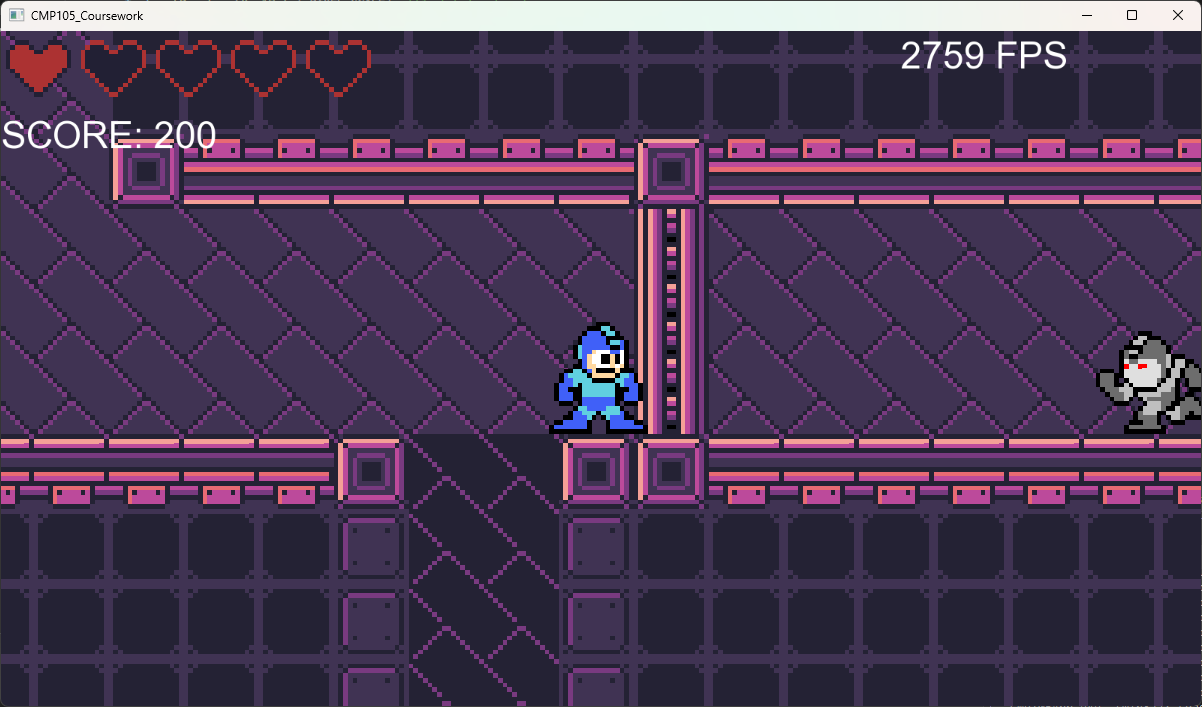
Ha! well yeah, that is a bit overkill. I should count my blessings, the other kind of “performance problem” is usually more difficult to fix.
Theory
Okay but why does the issue occur at high framerates?
In order to be colliding with the floor, the gameobject must fall at least one floating point unit inside of it. The bug is caused by a lack of floating point precision, where at a high framerate the gameobject’s acceleration and velocity are too low for them to move at all.
If I assume that the gameobject is around 100 tiles away from the origin, I can calculate the precision around that value. A bit of Googling, and I found a neat website for this: http://www.ehopkinson.com/cgi-bin/floatprecision_htmlout?float=100. This site says at 100, the next closest value is 0.000008 away. If the update to the gameobject’s position falls below that threshold, they won’t move, they won’t collide with the floor, “onFloor” will be “false”, and the falling sprite will be shown.
So, how much is the gameobject moving down per frame, what determines that? Gravity is a constant 8 units per second and is applied at the beginning of “EnemyRobot::Update(…)”:
// [vel.y can be assumed to be 0 before this because GameObject::collisionResponse(...) resets it]
vel.y += Level::GRAVITY * dt;
Then the robot is actually moved:
// [Level::PHYSICS_SCALE = 100.f]
move(vel * Level::PHYSICS_SCALE * dt);
I can work backwards to calculate the “dt” or “Δt” at which the game object will move exactly one unit:
Using the code snippets above, this is the amount the player will move
movement = Level::GRAVITY × Δt × Level::PHYSICS_SCALE × Δt
↓ Substitute in constants
0.000008 = 8 × Δt × 100 × Δt
↓ Cancel out both sides
0.00000001 = Δt × Δt
↓ Rearrange
Δt = √0.00000001
↓ Apply square root
Δt = 0.0001
↓ From the delta time, the frames-per-second can be calculated
FPS = 1 ÷ 0.0001 = 10,000
In the real world, the bug begins to occur before hitting the 10,000 FPS mark. This is because a small amount of precision is lost at each step in the collision detection calculation, meaning overlaps of only one unit can’t always be detected.